
Free Meowdoku Solver
Use our free Meowdoku Solver to paint any board, search similar puzzles, and reveal the cat placements for 4x4 to 12x12 color-grid challenges.
Your grid
Top 3 similar results
Free Meowdoku Solver
Meowdoku is one of those puzzle games that looks soft, cozy, and harmless at first glance. Cute cats, colorful regions, clean grids, simple controls — the whole vibe says “relaxing brain game.” Then you hit a level where every possible cat placement seems to break another rule, and suddenly the puzzle gets crunchy.
That’s exactly where our Free Meowdoku Solver comes in.
This tool is designed to help you recreate your Meowdoku board, search for a similar puzzle, and find the correct cat placement solution. Whether you’re stuck on a small 4x4 puzzle or wrestling with a larger 10x10 or 12x12 board, the solver gives you a faster way to compare your level with known puzzle layouts and see where each cat belongs.
It’s not just an answer button. It’s a practical helper for players who want to understand the board, check a tricky level, or get unstuck without randomly tapping cells and burning through mistakes.
What Is the Meowdoku Solver?
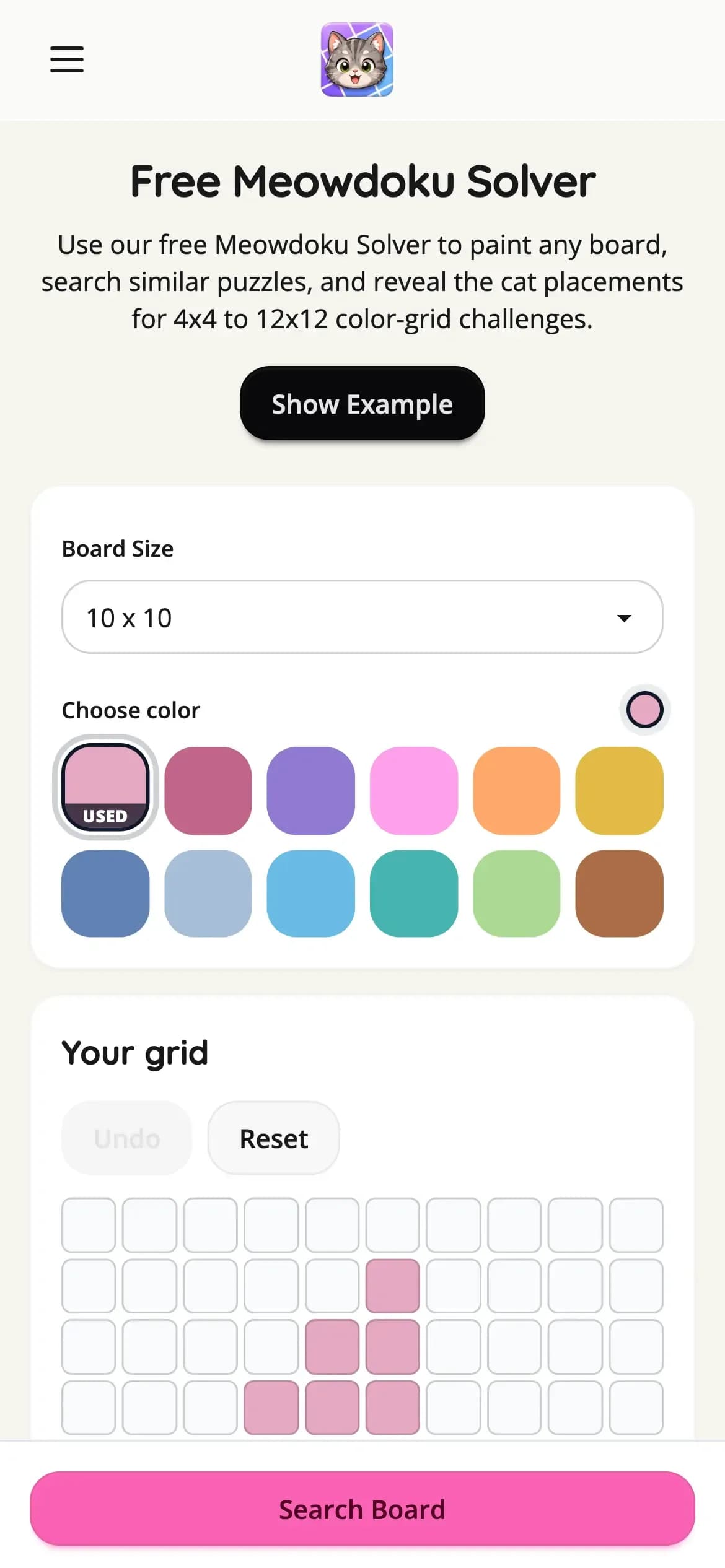
The Free Meowdoku Solver is an online tool that lets you rebuild the color layout of your current Meowdoku puzzle. First, you choose the size of your board. Then the solver shows a blank grid matching that size. From there, you use the color palette on the sidebar to paint the grid so it matches the puzzle you see in the game.
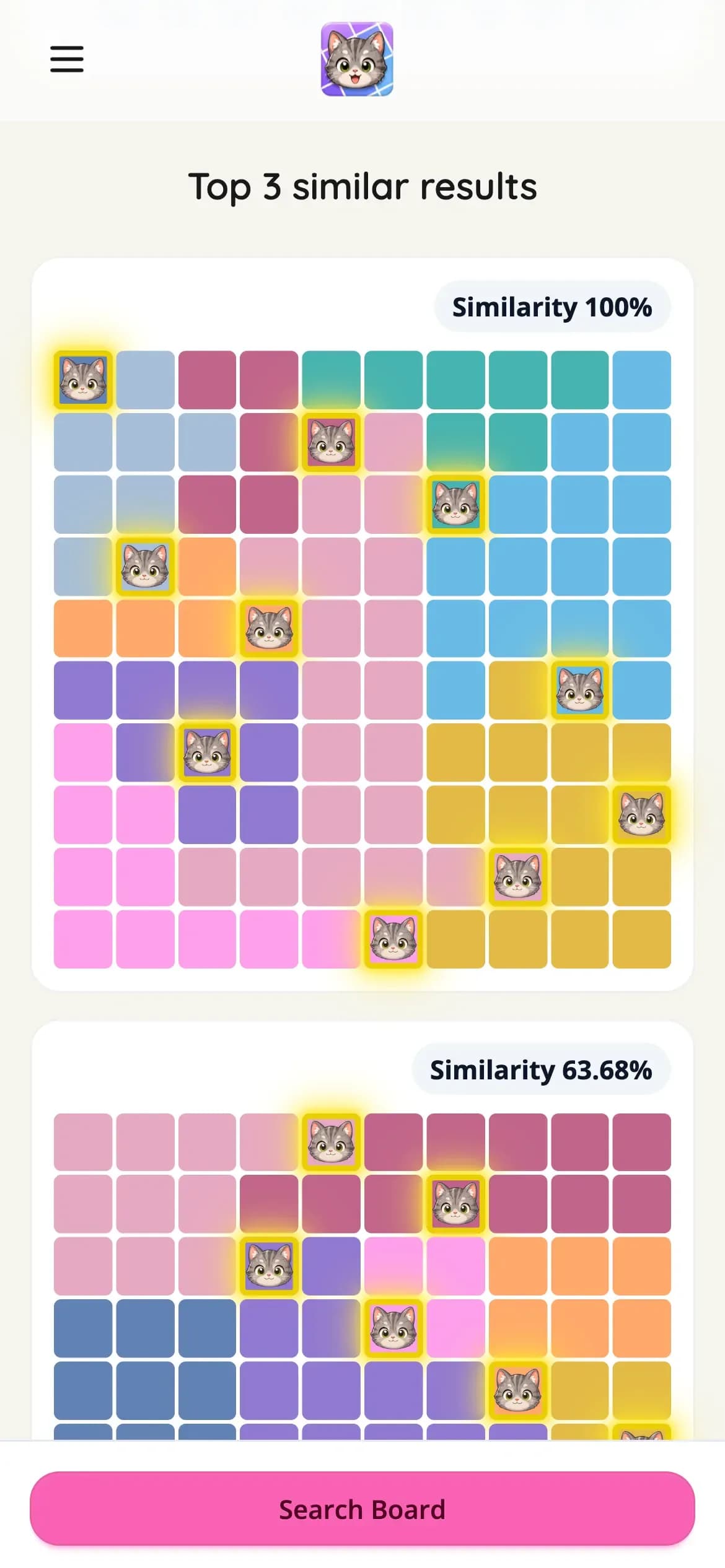
Once your board is recreated, click Search Similar. The solver will compare your painted board with available Meowdoku puzzle data and return a similar board, along with its solution. The solution shows the correct cat placements, so you can see exactly where the cats should go.
That makes the tool especially useful when you’re stuck between two or three possible moves. Instead of guessing and hoping the game accepts your placement, you can rebuild the puzzle, search it, and study the correct layout.
Supported Board Sizes
Meowdoku puzzles can vary in size, and the solver supports a wide range of board formats. You can select:
4x4 5x5 6x6 7x7 8x8 9x9 10x10 12x12
This range covers both simple beginner boards and larger, more demanding puzzles. Smaller boards are great for learning the rules, but bigger grids are where Meowdoku starts to show its teeth. More rows, more columns, more color regions, and more possible dead ends make the logic loop much harder to track in your head.
With the solver, you don’t need to manually describe the level or type in coordinates. Just choose the board size, paint the regions, and let the tool search for a similar layout.
How to Use the Free Meowdoku Solver
Using the solver is simple, but accuracy matters. The closer your painted board matches the puzzle in the game, the better the search result will be.
Start by selecting your board size. If your Meowdoku level is a 7x7 grid, choose 7x7. If it’s a larger 10x10 board, choose 10x10. Once you select the size, the solver will generate a matching grid.
Next, look at your puzzle and recreate the color regions. Choose a color from the palette on the sidebar, then click or drag across the grid to paint cells. You can use clicking for careful single-cell edits, or drag painting when a region covers several cells. This makes it faster to rebuild oddly shaped color areas without tapping each square one by one.
After the board looks right, click Search Similar. The solver will start searching and return a similar Meowdoku board. If a close match is found, you’ll see the board and its solution, including the correct cat placement.
Finally, compare the solution with your current level. You can use it to finish the puzzle, check your progress, or learn why a specific placement works.
Why Meowdoku Gets So Difficult
Meowdoku is based on a tight set of logic rules. Every color region needs exactly one cat. No two cats can appear in the same row or column. Cats also can’t touch each other, even diagonally.
Those rules sound easy when the board is small. On a 4x4 or 5x5 puzzle, you can usually scan the grid and spot the forced moves quickly. But once the board grows, the logic becomes much more layered. A cat placement in one region can block cells in multiple rows, columns, and neighboring regions. One bad assumption can make the whole puzzle collapse.
That’s the fun of Meowdoku, but it’s also where players get stuck.
Sometimes the problem isn’t that you don’t understand the rules. The problem is that there are too many possible moves to hold in your head at once. You might see that a cat must go somewhere in a color region, but not know which exact cell is safe. You might narrow a row down to two possible spots, only to realize both seem to create problems elsewhere. That’s where a solver becomes useful.
It gives you a clean way to check the final answer and reverse-engineer the logic.
A Solver That Helps You Learn
The best way to use the Meowdoku Solver isn’t just to copy the answer and move on. That works, of course, but you’ll get more value if you use the solution as a learning tool.
When the solver shows the cat placements, ask why each cat belongs there. Look at the row. Look at the column. Look at the color region. Then check the surrounding cells. In many cases, you’ll start to see the hidden pressure that forced the solution.
For example, one color region may look open at first, but most of its cells are blocked by cats that must appear in nearby rows or columns. Another region may only have one valid cell because every other cell would touch a neighboring cat diagonally. These small logic patterns are what make Meowdoku satisfying.
Once you see them a few times, you’ll start spotting them faster in future puzzles.
When Should You Use the Solver?
Use the Free Meowdoku Solver whenever a level stops being fun and starts feeling like a wall. There’s nothing wrong with getting help on a puzzle game, especially one built around strict deduction. Sometimes one missing insight is all that blocks the whole board.
The solver is helpful when you’re completely stuck, but it’s also useful when you simply want to verify a move. If you’re confident about most of the board but unsure about one region, rebuilding the puzzle can show whether your logic is on track.
It’s also a strong tool for players building walkthroughs, guides, or level solution pages. Since you can paint the board and search for similar layouts, it gives you a practical workflow for matching levels and finding solutions more efficiently.
Tips for Better Search Results
For the best results, make sure the board size is correct before you start painting. A 6x6 puzzle recreated as a 7x7 grid won’t match properly, even if the colors look similar.
Try to keep each color region accurate. You don’t need the exact same shade as the original game, but the shape of each region matters. If two cells belong to the same region in the game, paint them with the same color in the solver. If they belong to different regions, use different colors.
Drag painting is great for larger regions, but slow down when painting narrow areas or corners. A single wrong cell can change the structure of the board and make the search less accurate.
Before clicking Search Similar, quickly scan your recreated grid from top to bottom. Compare each row with the original puzzle. This extra check only takes a moment, and it can save you from getting a weaker match.
Free Online Help for Meowdoku Players
Meowdoku has a great core loop because it mixes cozy presentation with real logic pressure. The cats are cute, but the rules don’t mess around. Every row, column, color region, and diagonal relationship matters.
Our Free Meowdoku Solver is built for that exact moment when you want help without losing the puzzle’s structure. Choose your board size, paint the grid, search for a similar puzzle, and reveal the cat placements. You can use it for quick answers, careful checking, or deeper learning.
Whether you’re solving a tiny 4x4 puzzle or a bigger 12x12 grid, the solver gives you a cleaner way to move forward. No random guessing. No endless tapping. Just rebuild the board, find the match, and get back into the Meowdoku flow.