
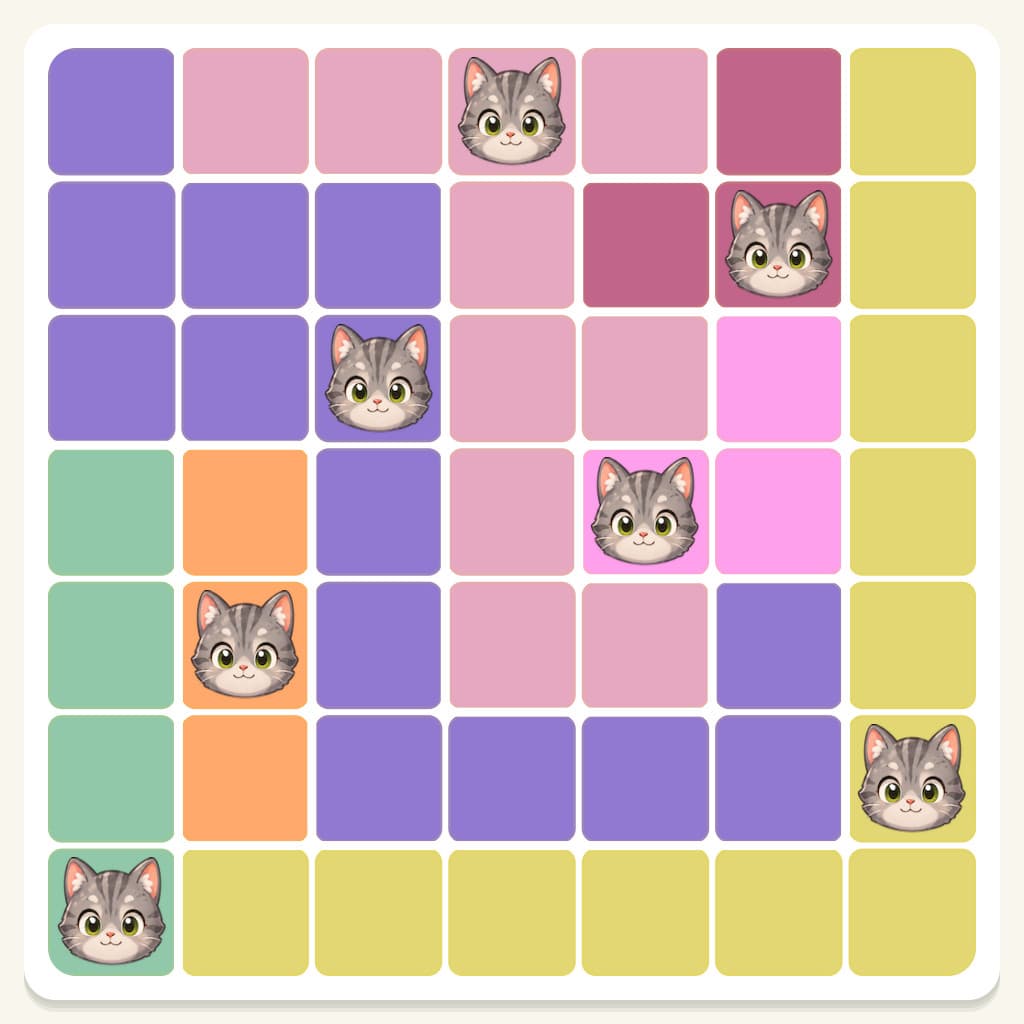

Meowdoku Level 591 Step-by-Step Logic Walkthrough & Explained
Follow the replay below. Each board shows the result after applying that step.
Meowdoku Level 591 Step 1: Mark X at R1 C2, R2 C2, and R3 C2 + 1 more: a region is locked to this column

The orange region must use column 2. No other region can use that column. Mark the highlighted cells with X.
Meowdoku Level 591 Step 2: Mark X at R1 C1, R2 C1, and R3 C1: a region is locked to this column
The sky blue region must use column 1. No other region can use that column. Mark the highlighted cells with X.
Meowdoku Level 591 Step 3: Mark X at R1 C5, R3 C5, and R5 C5 + 5 more: rows or columns are reserved
The pink and teal regions must use columns 5 and 6. No other region can use those columns. Mark the highlighted cells with X.
Meowdoku Level 591 Step 4: Mark X at R7 C3 and R7 C4: rows or columns are reserved
The yellow and magenta regions must use columns 3 and 4. No other region can use those columns. Mark the highlighted cells with X.
Meowdoku Level 591 Step 5: Mark X at R2 C7 and R3 C6: cats cannot touch
Every possible cat for the pink region conflicts with these cells. Cats cannot share a row, column, region, or diagonal touch. Mark the highlighted cells with X.
Meowdoku Level 591 Step 6: Mark X at R4 C1, R4 C2, and R4 C3 + 2 more: a region is locked to this row
The teal region must use row 4. No other region can use that row. Mark the highlighted cells with X.
Meowdoku Level 591 Step 7: Mark X at R5 C1, R5 C3, and R6 C1 + 1 more: cats cannot touch
Every possible cat for the orange region conflicts with these cells. Cats cannot share a row, column, region, or diagonal touch. Mark the highlighted cells with X.
Meowdoku Level 591 Step 8: Place cat at R7 C1: only legal cell
Place a cat here at . The sky blue region has no other legal cell.
Meowdoku Level 591 Step 9: Place cat at R5 C2: only legal cell
Place a cat here at . The orange region has no other legal cell.
Meowdoku Level 591 Step 10: Mark X at R2 C3: cats cannot touch
Every possible cat for the yellow region conflicts with these cells. Cats cannot share a row, column, region, or diagonal touch. Mark the highlighted cells with X.
Meowdoku Level 591 Step 11: Mark X at R2 C4 and R3 C4: cats cannot touch
Every possible cat for the magenta region conflicts with these cells. Cats cannot share a row, column, region, or diagonal touch. Mark the highlighted cells with X.
Meowdoku Level 591 Step 12: Mark X at R1 C6 and R1 C7: a region is locked to this row
The yellow region must use row 1. No other region can use that row. Mark the highlighted cells with X.
Meowdoku Level 591 Step 13: Mark X at R3 C7: cats cannot touch
Every possible cat for column 6 conflicts with these cells. Cats cannot share a row, column, region, or diagonal touch. Mark the highlighted cells with X.
Meowdoku Level 591 Step 14: Place cat at R6 C7: only legal cell
Place a cat here at . The brown region has no other legal cell.
Meowdoku Level 591 Step 15: Place cat at R3 C3: only legal cell
Place a cat here at . The magenta region has no other legal cell.
Meowdoku Level 591 Step 16: Place cat at R1 C4: only legal cell
Place a cat here at . The yellow region has no other legal cell.
Meowdoku Level 591 Step 17: Place cat at R2 C6: only legal cell
Place a cat here at . The pink region has no other legal cell.
Meowdoku Level 591 Step 18: Place cat at R4 C5: only legal cell
Place a cat here at . The teal region has no other legal cell.
Meowdoku Level 591 Result
All 7 cats are placed correctly:
- R1 C4
- R2 C6
- R3 C3
- R4 C5
- R5 C2
- R6 C7
- R7 C1